3.1. Assign static IP on master
3.1.1. Setting a static IP using ip
To temporarily set an IP you can simply set it via the ip
command. The currently configured IP addresses will be shown by
the ip addr command.
[root@master ~]# ip addr
...
3: eno2: <BROADCAST,MULTICAST,UP,LOWER_UP> mtu 1500 qdisc mq state UP group default qlen 1000
   link/ether 7c:c2:55:ed:29:d1 brd ff:ff:ff:ff:ff:ff
   altname enp5s0
   altname enx7cc255ed29d1
...
To add or remove an IP address use the ip addr add or ip addr del command.
[root@master ~]# ip addr add 192.168.0.1/20 dev eno2
[root@master ~]# ip addr
...
3: eno2: <BROADCAST,MULTICAST,UP,LOWER_UP> mtu 1500 qdisc mq state UP group default qlen 1000
   link/ether 7c:c2:55:ed:29:d1 brd ff:ff:ff:ff:ff:ff
   altname enp5s0
   altname enx7cc255ed29d1
   inet 192.168.0.1/20 scope global eno2
      valid_lft forever preferred_lft forever
...
3.1.2. Persistent static IP configuration
While configuration with the ip command is useful for experimentation,
we want to make our configuration permanent. We need to modify the
appropriate interface file in the /etc/NetworkManager/system-connections folder.
[root@master ~]# cd /etc/NetworkManager/system-connections
[root@master system-connections]# ls
eno1.nmconnection  eno3.nmconnection
eno2.nmconnection  eno4.nmconnection
Open the management interface file for eno2 (i.e., eno2.nmconnection) with a
text editor (e.g., vim) and modify its contents to the following.
[connection]
id=eno2
type=ethernet
interface-name=eno2
autoconnect=true

[ipv4]
method=manual
address1=192.168.0.1/20

[ipv6]
method=ignore
This will configure the interface during boot with a static IP.
Delete the manual configuration if you still have it, and restart
the NetworkManager service. Restarting this service will bring all
interfaces down and back up, similar to ip link set up/down.
[root@master ~]# ip addr del 192.168.0.1/20 dev eno2
[root@master ~]# systemctl restart NetworkManager
[root@master ~]# systemctl status NetworkManager
● NetworkManager.service - Network Manager
   Loaded: loaded (/usr/lib/systemd/system/NetworkManager.service; enabled; preset: enabled)
   Active: active (running) since Tue 2025-12-16 14:20:50 EST; 34s ago
Invocation: cbe484d80b8448d88b8b513e27d8956c
      Docs: man:NetworkManager(8)
   Main PID: 4633 (NetworkManager)
      Tasks: 4 (limit: 22476)
   Memory: 3.4M (peak: 3.9M)
      CPU: 235ms
   CGroup: /system.slice/NetworkManager.service
            └─4633 /usr/sbin/NetworkManager --no-daemon

Dec 16 14:20:50 master1 NetworkManager[4633]: <info>  [1765912850.2880] dhcp4 (eno1): state changed new lease, address=172.16.6.239, acd pending
Dec 16 14:20:50 master1 NetworkManager[4633]: <info>  [1765912850.2891] dhcp4 (eno1): state changed new lease, address=172.16.6.239
Dec 16 14:20:50 master1 NetworkManager[4633]: <info>  [1765912850.2908] policy: set 'eno1' (eno1) as default for IPv4 routing and DNS
Dec 16 14:20:50 master1 NetworkManager[4633]: <info>  [1765912850.3020] device (eno1): state change: ip-config -> ip-check (reason 'none', managed-type: 'assume')
Dec 16 14:20:50 master1 NetworkManager[4633]: <info>  [1765912850.3069] device (eno1): state change: ip-check -> secondaries (reason 'none', managed-type: 'assume')
Dec 16 14:20:50 master1 NetworkManager[4633]: <info>  [1765912850.3075] device (eno1): state change: secondaries -> activated (reason 'none', managed-type: 'assume')
Dec 16 14:20:50 master1 NetworkManager[4633]: <info>  [1765912850.3087] manager: NetworkManager state is now CONNECTED_SITE
Dec 16 14:20:50 master1 NetworkManager[4633]: <info>  [1765912850.3097] device (eno1): Activation: successful, device activated.
Dec 16 14:20:50 master1 NetworkManager[4633]: <info>  [1765912850.3111] manager: NetworkManager state is now CONNECTED_GLOBAL
Dec 16 14:20:56 master1 NetworkManager[4633]: <info>  [1765912856.2505] manager: startup complete
Ensure the configuration is correct via ip addr and reboot to verify that the setting is persistent.
[root@master ~]# ip addr
...
3: eno2: <BROADCAST,MULTICAST,UP,LOWER_UP> mtu 1500 qdisc mq state UP group default qlen 1000
   link/ether 7c:c2:55:ed:29:d1 brd ff:ff:ff:ff:ff:ff
   altname enp5s0
   altname enx7cc255ed29d1
   inet 192.168.0.1/20 brd 192.168.15.255 scope global noprefixroute eno2
      valid_lft forever preferred_lft forever
...
[root@master ~]# reboot
[root@master ~]# ip addr
...
3: eno2: <BROADCAST,MULTICAST,UP,LOWER_UP> mtu 1500 qdisc mq state UP group default qlen 1000
   link/ether 7c:c2:55:ed:29:d1 brd ff:ff:ff:ff:ff:ff
   altname enp5s0
   altname enx7cc255ed29d1
   inet 192.168.0.1/20 brd 192.168.15.255 scope global noprefixroute eno2
      valid_lft forever preferred_lft forever
...
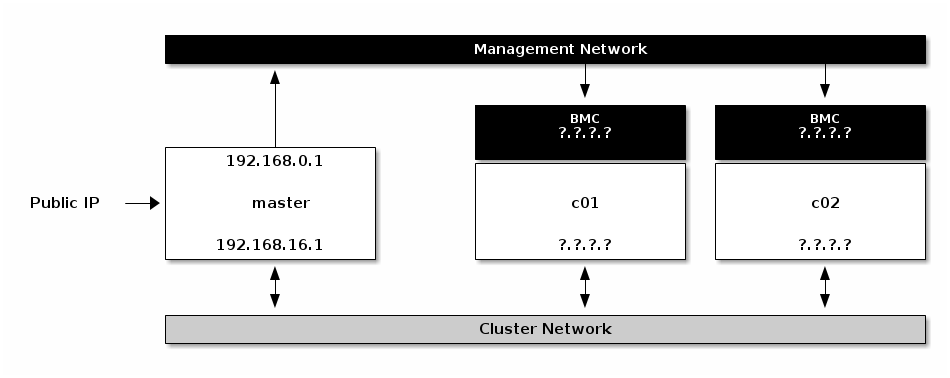
Master with assigned IPs